AI-powered IT support, made in Georgia

IT problems fixed in minutes, approved from your phone

Printer stopped, internet down, a PC frozen? Staff press one button. Dex finds the cause, you approve the fix with one tap, and Dex runs it and checks that it worked. No call-out, no waiting for a technician.

  • Free for 7 days, no card
  • Set up in about 15 minutes
  • Windows PCs and Macs, in English and ქართული

Approve from your phone

Nothing runs without a yes from your IT team.

Windows PCs and Macs

In the office, at home or on the road.

Runs on your network

Requests, history and the audit log stay on a server in your company.

English and Georgian

Staff ask for help in their own language.

How it works

How a request is handled

From “it doesn't work” to fixed and tested, without anyone walking over to the desk.

  1. 1

    Staff ask

    One tap on the desktop shortcut, in Georgian or English. Dex already knows who is asking and which computer they are on.

  2. 2

    Dex checks

    It tests the computer and your company's servers, and tells a problem on one computer from a problem for everyone.

  3. 3

    You approve

    A notification on your phone with the proposed fix. Nothing runs without your approval.

  4. 4

    Dex fixes and tests

    It runs the fix, checks that it worked and tries the next one if it didn't. Fixes that worked for you before come first.

Video tutorials

See Dex at work

Four short videos, each under a minute.

Read the setup guide

0:51

From a staff member's click to a tested fix

A printer stops. Dex finds why, you approve the fix, and Dex runs it and checks that printing works.

0:37

Approve a fix from your phone

Open a request in the Dex app, see what is wrong, and approve the fix with one tap.

0:37

See what Dex saved you

Problems fixed, time and money saved for any period, and a report emailed to whoever oversees IT.

0:52

Set up Dex

Sign in, tell Dex about your company, and it starts watching your network.

The Dex panel

Every computer in your company, at a glance

Dex keeps a live list of your computers, servers and network devices, checks your internet and the websites you rely on every 2 minutes, and sends a short report every working morning.
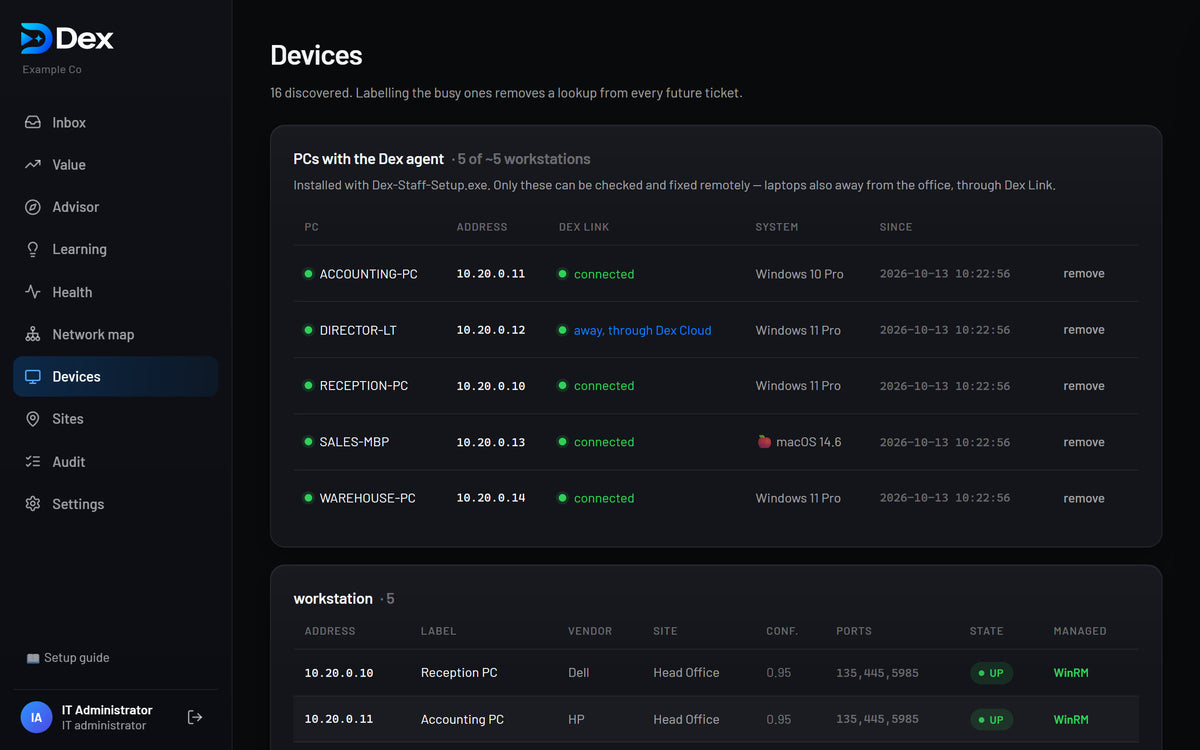
  • A network map of every device Dex finds
  • Alerts when the internet, a server or a website goes down
  • A morning report every working day
The Dex panel's Devices page: staff PCs and Macs connected through Dex Link

New · Value

See what Dex saves your company

Dex counts every problem it fixed, how long each fix took, and how long the same fix takes by hand. Choose a week, a month, three months, a year or your own dates.

  • Every request, from received to fixed and tested
  • Time and money saved, worked out from your own costs
  • On your phone too, in the Dex app
The Dex panel's Value page: problems fixed, time and money saved

New · Email reports

A report for whoever oversees IT

Add the email address of the person responsible for IT, and Dex sends them what it fixed and what that saved: every day, week, month or year. Nobody has to open the panel to see it.

  • Each problem fixed, with Dex's time against the time by hand
  • Time and money saved in the period
  • Each address confirms once before reports start
The weekly Dex report email

New · Business, Pro and Enterprise

Warnings before hardware fails

Dex reads each computer's own health data and tells you in time to replace a part, before it stops someone working.

  • Failing or worn-out drives, and drives running hot
  • Worn laptop batteries
  • Repeated crashes and sudden power-offs, told apart from a power cut

New

Macs, and laptops away from the office

Dex looks after Macs as well as Windows PCs. A laptop at home or on the road connects to your Dex through Dex Cloud, encrypted end to end: Dex Cloud passes the messages on but cannot read them.

  • Macs with macOS 11 or newer
  • Checked and fixed the same way as in the office
  • Each computer proves who it is with its own key

Features

Everything your IT support needs

Included in every plan unless marked.

One-click help for staff

A help page in English or Georgian. Dex knows who is asking and which PC they are on.

Automatic diagnosis

Printers, internet, email (Microsoft 365 or Google Workspace), slow or frozen PCs, shared folders and your own business software.

Safe, tested fixes

From a fixed, approved list. Every fix is tested, and Dex remembers what worked for you.

Installing programs

After your approval, staff get administrator rights on their PC for 15 minutes, taken away by themselves.

Live monitoring

Your internet, routers, servers and the websites you rely on, such as RS.ge, every 2 minutes, with alerts.

Network map and morning report

Every device Dex finds on your network, and a short summary every working day.

AI for unusual problems

When the built-in rules can't pin a problem down, AI suggests a cause and a fix. You can switch it off.

AdvisorBusiness and up

Security and reliability recommendations based on what Dex sees on your network, each with the evidence behind it.

Sign-in for your IT team

Each administrator gets their own sign-in, with Google or Microsoft where available, and their own trail in the audit log.

Security

Safe by design

Dex can change your company's computers, so it is built to be trusted.

How Dex keeps your company safe

A fixed list of approved actions

On Windows PCs, Windows itself blocks anything outside the list, so even a hijacked Dex server could do nothing else.

Nothing runs without approval

Every fix needs a person's yes, and every check, approval and fix is written to the log.

No open ports

Your network opens nothing to the internet. Phones and laptops away from the office connect through Dex Cloud.

Passwords that change themselves

The account Dex uses on each Windows PC gets a new password every 30 days, made on the PC itself.

Encrypted end to end

Laptops away from the office talk to your Dex server through Dex Cloud, which cannot read the messages.

AI with less of your data

Details are shortened and your company name is not sent. With your own Anthropic key, requests skip Dex Cloud.

Who is behind Dex

Built in Georgia, for companies here

Dex began as the IT assistant of a working company in Georgia, built so that its printers, internet and PCs got fixed without waiting for a technician. Now it is ready for yours.

  • Built and supported in Georgia
  • Answers in Georgian and English
  • Your company's data stays on your own server
  • No card for the trial, cancel any time

Ask us anything

Plans

Plans for every size of company

Every plan starts with a free 7-day trial. No card needed.

Starter

Up to 15 computers

99 GEL/ month

PCs
15
Offices
1
AI / month
50
  • Staff help page, diagnosis and tested fixes
  • Windows PCs and Macs, in the office and away
  • Monitoring, network map and morning report
  • What Dex saved, with reports by email
Recommended

Business

Up to 50 computers

249 GEL/ month

PCs
50
Offices
1
AI / month
300
  • Everything in Starter
  • Advisor and health checks
  • Warnings before hardware fails
  • Learns which fixes work for you

Pro

Up to 150 computers and 5 offices

499 GEL/ month

PCs
150
Offices
5
AI / month
1,500
  • Everything in Business
  • Branch offices, watched from one Dex
  • Setup session included
  • Priority support

Enterprise

More than 150 computers or 5 offices

Custom

PCs
No limit
Offices
No limit
AI / month
Agreed
  • Everything in Pro
  • Volume pricing and invoice billing
  • Onboarding and training for your IT team
  • Support response times agreed in your contract
  • Help with security reviews and data protection agreements

Billed monthly · cancel anytime · prices in Georgian lari · Enterprise by quote

Questions

What do I need to run Dex?

A Windows PC or server on your network that stays switched on: Windows 10 or 11, or Windows Server 2016 or newer. Staff computers need Windows 10 or 11, or macOS 11 or newer. The Dex app runs on iPhone and Android.

Does anything leave our network?

Requests, history and the audit log stay on the Dex server in your company. Your phone, and laptops away from the office, connect through Dex Cloud, which passes messages on without storing them. If you keep AI diagnosis on, a shortened description of an unusual problem is sent without your company name. Privacy details.

Can Dex break something?

Dex only runs actions from a fixed, approved list, and only after a person approves them. Each fix is tested afterwards, and every action is logged. How Dex keeps your company safe.

How long does setup take?

About 15 minutes: install Dex Server, answer a few questions, run the staff setup on each computer and pair your phone. Follow the step-by-step guide.

What counts as a PC?

Each staff computer you set up with Dex, Windows PC or Mac, counts as one. Printers, routers and the other devices Dex watches do not count.

Do you work with large organisations?

Yes. For more than 150 PCs or 5 offices, the Enterprise plan covers unlimited computers, offices and sites, invoice billing, onboarding and training, and help with your security review. Get a custom quote.

Is Dex available in Georgian?

Yes. The staff help page and the Dex app work in English and Georgian. Read about Dex in Georgian.

Try Dex free for 7 days

On up to 15 PCs, with no card and no sign-up. Rolling Dex out across a large organisation? Talk to us.